
How to Use UTM Parameters
What is a UTM Parameter?
UTM parameters are short tags added to the end of a URL to help track where website traffic comes from. They are most commonly used in marketing campaigns so you can see which email, ad, social post, or other promotion led someone to click through to your website.
When someone clicks a link with UTM parameters attached, analytics tools like Google Analytics can read those tags and categorize the visit. This makes it easier to understand which campaigns are driving traffic, which channels are working best, and how people are finding your site.
For example, instead of seeing a visit simply come from “Facebook” or “email,” UTM parameters can tell you that the visitor came from a spring sale email, a paid Instagram ad, or a specific newsletter button.

What UTM stands for
UTM stands for Urchin Tracking Module. The name comes from an older analytics platform that eventually became part of Google Analytics. Even though the name is a little outdated, UTM parameters are still widely used today.
What UTM parameters are used for
UTM parameters help you answer questions like:
-
Which email campaign drove the most traffic?
-
Did more people click the homepage banner or the button in the body of the email?
-
Is paid social traffic performing better than organic social traffic?
-
Which ad variation got the most clicks?
-
Which marketing campaign generated the most conversions?
Without UTM parameters, a lot of campaign traffic can get grouped together in analytics in ways that make reporting less useful.
The 5 Standard UTM Parameters
There are five standard UTM parameters you can add to a URL. Three are commonly required for consistent reporting, and two are optional but very useful when you want more detail.
1. utm_source
What it is:
The platform, website, tool, or sender that is driving the traffic.
What it tells you:
Where the visitor came from.
Examples:
-
google -
facebook -
linkedin -
mailchimp -
newsletter
Example use cases:
-
A monthly email newsletter:
utm_source=newsletter -
A Facebook post:
utm_source=facebook -
A Google Business Profile link:
utm_source=google-business-profile
Example in a URL:
?utm_source=facebook
2. utm_medium
What it is:
The type of marketing channel being used.
What it tells you:
How the traffic got to the site.
Examples:
Example use cases:
-
Email campaign traffic:
utm_medium=email -
Organic social post traffic:
utm_medium=social -
Paid search ad traffic:
utm_medium=cpc
Example in a URL:
&utm_medium=email
3. utm_campaign
What it is:
The name of the specific campaign, promotion, or initiative.
What it tells you:
Which broader marketing effort the click was associated with.
Examples:
-
spring-fundraiser -
open-house-2026 -
summer-sale -
brand-awareness -
giving-tuesday
Example use cases:
-
A seasonal sale campaign:
utm_campaign=summer-sale -
An enrollment push:
utm_campaign=fall-enrollment -
A fundraising drive:
utm_campaign=year-end-giving
Example in a URL:
&utm_campaign=spring-fundraiser
4. utm_term
What it is:
A label traditionally used for paid search keywords, but it can also be used more flexibly to track targeting details.
What it tells you:
What keyword, audience, or targeting term is associated with the link.
Examples:
-
private-college -
summer-camp -
alumni-donors -
marketing-director
Example use cases:
-
Tracking a Google Ads keyword:
utm_term=private-college -
Distinguishing audience segments in paid campaigns:
utm_term=parents -
Tracking an ad group or audience type:
utm_term=remarketing
Example in a URL:
&utm_term=summer-camp
5. utm_content
What it is:
A way to differentiate between similar links or creative variations within the same campaign.
What it tells you:
Which version of a link, button, ad, or placement was clicked.
Examples:
Example use cases:
Example in a URL:
&utm_content=header-button
Example of a Full UTM Link
Here is a regular page URL:
https://www.example.com/apply/
Here is that same URL with UTM parameters added:
https://www.example.com/apply/?utm_source=facebook&utm_medium=social&utm_campaign=fall-enrollment&utm_term=parents&utm_content=video-ad
This tells analytics that the visitor came from:
-
Source: Facebook
-
Medium: Social
-
Campaign: Fall enrollment
-
Term: Parents
-
Content: Video ad
How to Create a UTM Link
Step 1: Start with the page URL
Choose the destination page you want people to land on.
Example:https://www.example.com/contact/
Step 2: Decide what you want to track
Before building the link, define the campaign details you want to measure.
For example:
-
Where is the link being shared?
-
What type of channel is it?
-
What campaign is it tied to?
-
Are you trying to distinguish audiences, placements, or creative versions?
Step 3: Add your required parameters
At minimum, most campaigns should include:
-
utm_source -
utm_medium -
utm_campaign
Example:
https://www.example.com/contact/?utm_source=newsletter&utm_medium=email&utm_campaign=april-update
Step 4: Add optional parameters if needed
If you want more detail, also add:
-
utm_term -
utm_content
Example:
https://www.example.com/contact/?utm_source=newsletter&utm_medium=email&utm_campaign=april-update&utm_content=footer-button
Step 5: Use consistent naming
UTM data is only useful if naming stays consistent. For example, using Facebook, facebook, and fb across different links can split your reporting into multiple entries.
A few best practices:
-
Use lowercase
-
Use hyphens instead of spaces
-
Be consistent across campaigns
-
Keep names short but descriptive
Good example:utm_campaign=summer-open-house
Less ideal example:utm_campaign=Summer Open House 2026 Final Version
Step 6: Test the URL
Paste the link into your browser and make sure it loads correctly. The page should work normally even with UTM parameters attached.
Step 7: Use the tagged link in your campaign
Once the URL is built and tested, use it in your email, ad, social post, QR code, button, or other marketing asset.
Common Marketing Examples
Email campaign example
https://www.example.com/services/?utm_source=newsletter&utm_medium=email&utm_campaign=seo-promo&utm_content=primary-button
Use this when sending an email and you want to track clicks from the main call-to-action button.
Paid ad example
https://www.example.com/apply/?utm_source=google&utm_medium=cpc&utm_campaign=fall-enrollment&utm_term=nursing-degree&utm_content=text-ad-a
Use this when tracking a paid Google ad and differentiating keyword and ad variation.
QR code example
https://www.example.com/visit/?utm_source=print&utm_medium=qr&utm_campaign=campus-brochure
Use this when placing a QR code in a printed mailer or brochure and you want to measure scans.
Best Practices for UTM Parameters
Keep naming conventions standardized
Decide on a format and stick with it. This helps keep reports clean and easier to understand.
Don’t use UTMs on internal links
UTM parameters should be used for incoming campaign traffic, not for links moving people around within your own website. Using them internally can overwrite the original traffic source in analytics.
Be clear but concise
Use names that make sense later when you are reviewing reports. A link should be easy to identify without being overly long or messy.
Track only what matters
You do not have to use all five parameters every time. Use the ones that give you helpful reporting without overcomplicating the link.
Recommended Minimum Setup
For most campaigns, a solid starting point is:
-
utm_source -
utm_medium -
utm_campaign
Then add:
-
utm_contentwhen testing multiple link placements or creative versions -
utm_termwhen tracking keywords, audiences, or ad groups
How and where can I find this information?
Google Analytics
In Google Analytics 4, UTM parameters show up as traffic dimensions—primarily under Source, Medium, and Campaign.
The quickest place to view them:
1. Go to Reports → Acquisition → Traffic acquisition. This is the main report you’ll use.
By default, GA4 shows something like:
-
Session default channel group
1. Click the dropdown and switch to:
-
Session source / medium (most common)
-
Session campaign (to focus on campaigns)
2. Then add secondary dimensions as needed. Click the ➕ icon next to the primary dimension and add:
-
Session campaign
-
Session manual ad content
-
Session manual term
Pro Tip: Use “Session” vs “First User” carefully
GA4 has two versions of many dimensions:
-
Session source / medium / campaign → based on the current visit
-
First user source / medium / campaign → based on how the user first found your site
👉 For campaign tracking, you almost always want Session.
Form Submission Block in Editor
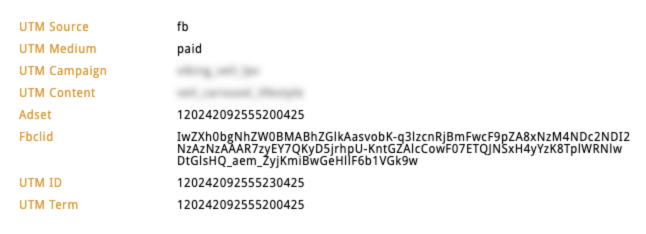
Your native webiste contact form submissions automatically capture entry URL UTM parameters, even if a visitor clicked through from a campaign and then browsed the site before submitting a form.
You can see this information inside each individual form submission in your website form block. Here's what that looks like:
Other relevant articles:
Summary
UTM parameters are a simple but powerful way to track marketing traffic more accurately. By adding a few tags to the end of a URL, you can better understand which campaigns, channels, and creative elements are driving people to your website.
When used consistently, UTM links make campaign reporting much more useful and help you make better marketing decisions over time.